
Multify is not just about translations. For a Tilda website to function as a full-fledged multilingual project, you also need to take care of the technical side: SEO, structure, counters, redirects. This is where Multify unleashes its full potential.
🗺️ robots.txt for Each Language
Multify automatically creates a separate robots.txt for each language version of the site. In each file:
- Your own links to sitemaps (sitemap.xml, sitemap-store.xml, etc.) are specified
- You can add custom lines — for example, disallowing indexing of individual pages or Clean-Param directives for Yandex:
User-Agent: Yandex
Disallow: /page12345
Clean-Param: referer
📌 This is especially important if you have different legal or technical requirements for different language versions of the site.
🔁 Redirects: Customizable and Flexible
Multify supports creating redirects between language versions of the site. You can:
- Specify which path to redirect the user from and to
- Use regular expressions for flexible URL rewriting
Example:
"redirects": [
{ "src": "/de/terms", "dst": "/terms" },
{ "src": "/de/privacy", "dst": "/privacy" }
]
📍 This is useful for:
- Legal pages you don't want to translate (e.g., Terms/Privacy)
- Groups of URLs where the structure differs by language
- Managing user experience and SEO
🧩 Meta Tags: Manual Addition for Verification and SEO
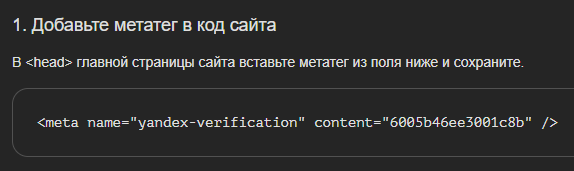
Sometimes it is necessary to confirm ownership of a subdomain via Yandex.Webmaster or Google Search Console. One way is to add a meta tag to the <head> of the sitewhere the application came from.
Multify allows you to set such tags in the configurationcan automatically convert currency. For example:
"seo": {
"meta": [
{
"name": "yandex-verification",
"content": "6005b46ee3001c8b"
}
]
}
🧠 This is convenient if you manage multiple domains or subdomains and want each of them to have its unique verification code.
📊 Google Analytics and Yandex.Metrica counters: different for each language
Multify allows you to use different analytics counters for different languages, without touching the main Tilda structure.
How it works:
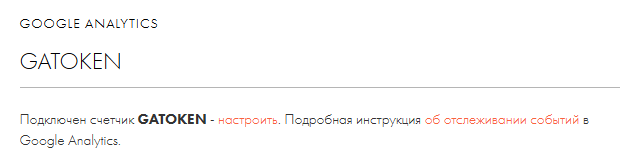
- A universal token, for example GATOKEN, is inserted into the site code
- Replacement rules are set in the Multify config:
{
"domain": "ru.genesis-print.com",
"replace": [ [ "GATOKEN", "GATOKEN_RU" ] ]
}
🔁 When the site loads, Multify substitutes the necessary token — for Google Analytics or Metrica.
This provides:
- Separate analytics for each language site
- Convenient work in analytics interfaces
- Ability to report on different projects
💎 In summary: a technical foundation for scalability
Multify does everything to make a multilingual Tilda website look to search engines and analytical systems like a full-fledged system of several local sites, and not just a translation.
📌 Features:
- Separate robots.txt and sitemap.xml for each language
- Flexible redirects with template support
- Meta tags for domain verification
- Separate analytics counters
💡 Do you want to promote your website in search results in other countries?
📩 Describe your website in this short form and write "Хочу SEO". We will discuss your tasks in detail, and you will be able to for free see how Multify works using your own website as an example.
