

Do you buy goods in China for yuan and sell them in Russia for rubles? Or perhaps you sell goods from Europe for euros? Currency exchange rates change daily, and prices in your Tilda catalog have to be updated manually. Even worse, Google indexes your store with prices of $1 instead of the actual $99.
This problem is familiar to everyone who sells imported goods and has tried to create an online store on Tilda. In this article, we will analyze why Tilda does not handle multi-currency "out of the box", why simply modifying the site does not help solve the problem completely, and what needs to be done to solve this problem correctly.
Contents
Problem #1: Manual price updates kill your time and money
Imagine a typical situation: you have an electronics online store.
- 300 products in the catalog
- Purchasing from suppliers in dollars: from $50 to $500 per unit
- The dollar exchange rate changed from 75₽ to 85₽
What needs to be done manually:
- Open an Excel spreadsheet with the price list
- Recalculate 300 items at the new rate
- Add your markup to each item
- Export the updated file in CSV format
- Upload the file to Tilda via catalog import
- Check that everything loaded correctly
This can easily take 2-3 hours of your time.
What if you have 1000 products? Or several currencies at once (dollars, euros, yuan)?
Routine turns into a nightmare.
Tilda Doesn't Solve This Problem Out of the Box
Tilda is an excellent builder, but it has a strict limitation: you can only set one currency for the entire project. This currency is specified in the site settings (Settings → Payment Systems → Currency Symbol) and applies globally to all products.
However, it does not have a built-in mechanism for automatically recalculating prices based on exchange rates and converting prices "on the fly" when the page loads.
The only official way is to change prices manually or via CSV file import. Which, as we already understand, is unrealistic for business.
Problem #2: A "Crutch" with the Wrong Currency Will Break Your SEO
Some store owners resort to a trick:
- They enter prices into the Tilda catalog in dollars: $100
- But in the site settings, they specify the currency "₽" (to accept payments in rubles through Russian payment systems)
What happens as a result: The site displays "100₽" instead of the real price.
Then, they install a JavaScript modification on the site that recalculates this price at the current exchange rate directly in the browser. In fact, many do this.
Why JS Conversion Doesn't Solve the Problem with Search Engines?
But here's the catch: search engine bots index the page before JavaScript executes.
Google and Yandex receive the original HTML of your page, where the price "100₽" is indicated, and index exactly that. The Tilda modification for JavaScript, which is supposed to recalculate the price to "8 000₽", simply does not have time to execute for the bot. Therefore, to change the micro-markup on the page using a Tilda modification.
What visitors see on the site:
Samsung Galaxy S24 Smartphone
Price: 80 000 ₽
What Google and Yandex see in the micro-markup of the product card:
<meta itemprop="price" content="100.00">
<meta itemprop="priceCurrency" content="RUB">
As a result, users see in the search results:
Samsung Galaxy S24 Smartphone — $1
Consequences for Your Business
The downsides here are obvious: even if search engines display product snippets from your site, the price in them will be incorrect — instead of $987, it shows $1.
Customers click expecting a super discount and leave disappointed after seeing the real price.
Low organic CTR — people don't understand the real cost and don't click on your products in search, your offers fall into the area of banner blindness.
How to Check for the Problem on Your Site
Google provides a free Rich Results Test tool , which shows exactly how the search robot sees structured data on your site.
Here's how you can check this yourself:
- Open https://search.google.com/test/rich-results
- Paste a specific link to a product card from your catalog (not the main page!)
- Click the "Test URL" button
- Look at the "Detected products" section — what price does Google see?

If you have JS conversion, you will see something like this:
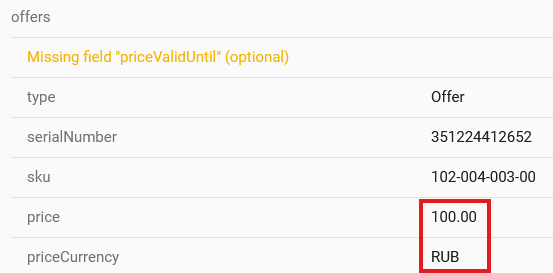
This tool will immediately show the scale of the problem. Check a few product cards — if the prices are incorrect, search engines are indexing your catalog with errors.
Unlike JS modifications for Tilda, Multify converts prices directly in the page's source code, which means that the micro-markup displays the actual amount and rate.
What are the existing solutions?
Option 1: Update prices manually
How it works: Every time the exchange rate changes by 2-5%, the manager opens Excel, recalculates all positions, and uploads the updated price list via CSV import to Tilda.
This method has obvious drawbacks:
- Time: 2-3 hours of work with each update = about 10 hours per month
- Human factor: easy to forget to update or make a mistake in calculations
- Does not scale: the more products, the longer the process
- Losing money: until you update prices, you either sell at a loss (if the rate has increased) or lose competitiveness (if the rate has decreased)
Cost: ~10 hours of manager's work × $6.17/hour = $61.74/month + nerves and stress
Option 2: Create two projects in Tilda
You can create two separate websites in Tilda: one with prices in dollars, the other in rubles. In this case, there will be no indexing problems, but you will have to maintain two versions of the site instead of one.
This method is technically more sound, but still labor-intensive:
- Content duplication: every product, every page needs to be created twice
- When adding a new product, you will need to add them to both projects
- Changed the description? You will also need to change it in two places
- SEO problems are not excluded: now search engines may consider these pages duplicates, as for a search engine these are two different sites on different domains
Cost: double content work + double Tilda payment
An Easy Solution Without Compromises: Automatic Currency Conversion with Multify
Multify is a service that solves the problem of multi-currency for Tilda correctly, without JavaScript crutches.
You store prices in the catalog in the base currency
You leave prices in Tilda as they are from the supplier — in yuan, dollars, or euros. This is convenient: your price list matches the catalog on the website, no need to recalculate manually every time.
Multify converts prices on the server side
Connection happens via DNS — you simply change the domain settings, and all traffic starts passing through Multify. No scripts need to be installed on the site.
When a user opens a product card, Multify retrieves the price from the catalog (e.g., $100), converts it using the live currency exchange rate, taking into account your markup and rounding, and delivers a ready page with the correct price in rubles.
The key point: conversion happens before the page reaches the user's browser or a search bot. Therefore, Google and Yandex immediately see the correct prices in the microdata.
Real case: sneaker store from China
The online store sold branded sneakers, which it purchased in China for yuan. The catalog had about 200 models, with prices ranging from ¥300 to ¥1200.
The owner commissioned a programmer for a JS modification to convert prices. On the website, visitors saw the correct prices in rubles, but a problem arose: in Yandex's organic search results, products were displayed with prices like "450 ₽" instead of the actual "7 900 ₽".
Because of this, traffic from search came with the expectation of a low price; people saw the real cost and immediately left. Therefore, the conversion from organic search was catastrophically low, and the site did not receive quality traffic, despite good search rankings.
A check via Rich Results Test confirmed: Google saw "450 RUB" instead of "7 900 RUB".
After connecting Multify, organic traffic increased by 20% due to correct prices in search snippets, and conversion increased several times over.
The problem with currency conversion on Tilda seems minor until you start calculating the real losses. Manager's working hours spent updating price lists, incorrect prices in search results, disappointed customers leaving — all of this adds up to significant money.
JS modifications seem like a simple solution, but they break SEO. Search engines index prices that are not what people see, and this kills organic traffic. Check your site with the Rich Results Test right now — most likely, Google and Yandex see your products completely differently than you would like.
Multify solves this problem technically correctly: price conversion happens on the server side, which means that both users and search engines will see the correct price.
🚀 Want to translate your entire website, including catalog and posts, into any number of languages in 5 minutes?
